
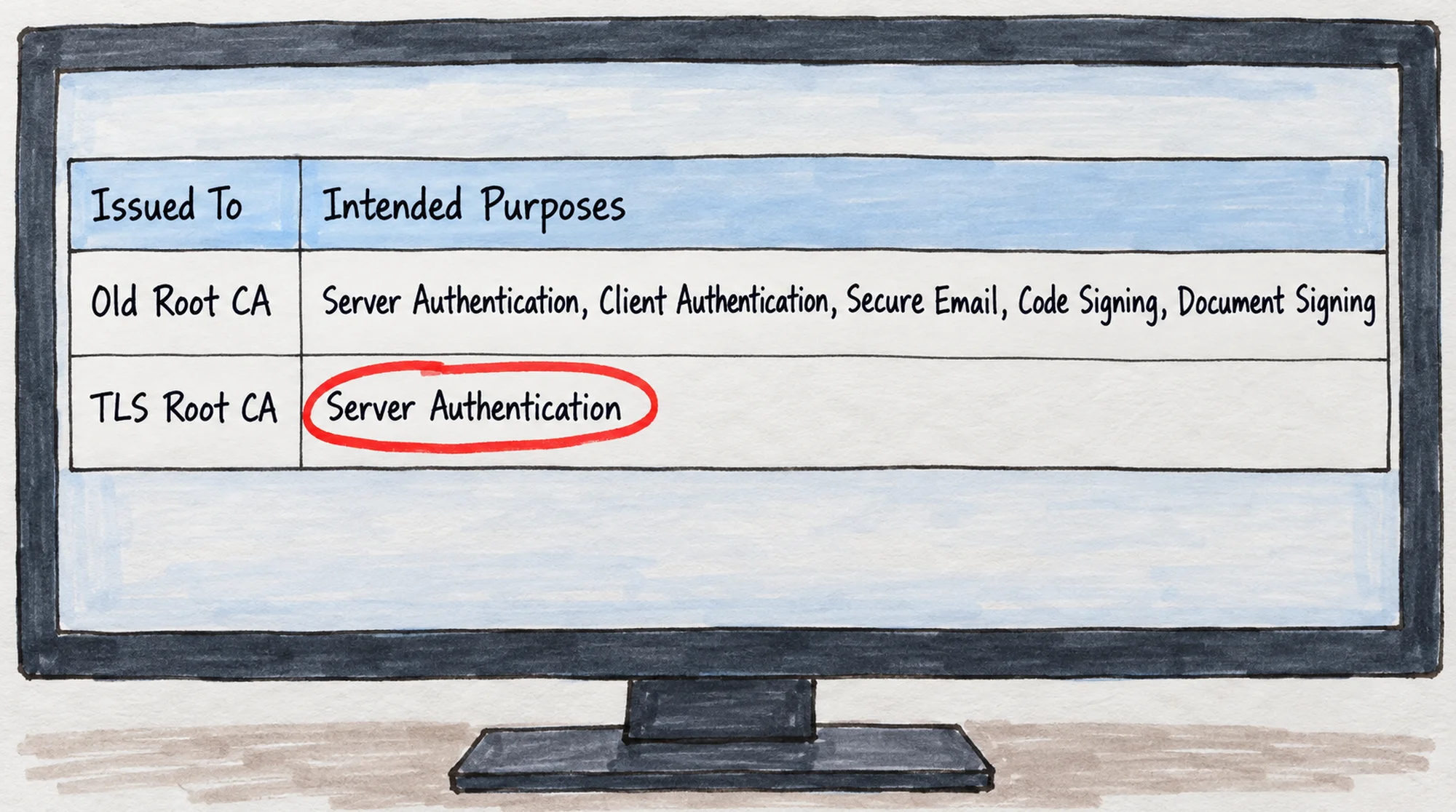
Every publicly trusted certificate authority is replacing its root certificates. The underlying reason is age: Mozilla and Chrome remove trust in root keys that are more than 15 years old, and the roots found in almost every device today date from 2009 and 2010. At the same time, the root programs require the new roots to be used for web servers only. Sectigo switched in spring 2025, GlobalSign on 27 July 2026, and DigiCert changes its default on 15 October 2026. The transition is not optional, and it affects everyone who runs a server with a public certificate.
A new root certificate is only trusted on clients that received it in an update. An Android 13 phone, an iPhone on iOS 16 or a Java installation from before July 2025 does not know Sectigo's new root. The answer is a cross-signed certificate that ties the new root to an old, widely distributed one. On Linux you add the certificate to the chain and you are done. On Windows Server you must also disable the new root locally and reboot, because Schannel otherwise picks the short chain no matter what you install.
Why every CA is changing its root certificate
Two rules from the root programs that decide which root certificates are trusted in practice drive the transition. They have different consequences.
Old root keys may no longer be used
Mozilla and Chrome remove trust in a root 15 years after its key was generated. At Mozilla, keys from 2008 to 2009 lose trust on 15 April 2027, and keys from 2010 to 2011 on 15 April 2028. USERTrust RSA (Sectigo) and GlobalSign Root CA - R3 date from 2010 and 2009 respectively. They sit in almost every device manufactured since, and that is exactly why they cannot continue: a key that has been in use for 15 years has accumulated too much risk to remain the anchor for the internet's TLS traffic. Microsoft also limits new roots to a maximum validity of 10 years.
This is the rule that forces CAs onto new roots. A new root is only trusted on devices that received it in an update, which is why a cross-signed certificate is needed for as long as older devices are in use.
New roots may only be used for web servers
At the same time, all four root programs have introduced a requirement for dedicated TLS hierarchies. A root may no longer issue certificates for web servers alongside certificates for email (S/MIME), code signing or document signing. The requirements arrived in this order:
- Chrome Root Program Policy v1.6 (effective 15 February 2025): a hierarchy must be dedicated to a single use case, and an intermediate under a TLS root may only assert
serverAuth. From 15 June 2026, roots in hierarchies that do not meet the requirement receive an SCTNotAfter date, after which new certificates from that hierarchy are no longer accepted. - Microsoft Trusted Root Program Requirements v1.2 (effective 20 May 2026): separate trust anchors per EKU from 1 July 2026, and new roots may have a maximum validity of 10 years.
- Mozilla Root Store Policy v3.1 (effective 1 July 2026): new roots must have a single purpose, and dual-purpose roots must complete their transition by 31 December 2028.
- Apple Root Program Policy v2.0 (effective 1 August 2026): new roots may carry only one trust purpose, and subordinate CAs must be single-purpose after 1 July 2027.
The single-purpose requirement does not in itself mean a new root. DigiCert met it by revoking the intermediates under Global Root G2 and G3 that were not for TLS, and kept the roots from 2013. But when a CA has to create new roots anyway because of age, they are made single-purpose from the start.
Chrome's two-roots-per-CA limit
Chrome Root Program Policy v1.8 (effective 5 February 2026) sets a ceiling: from 15 September 2027 the Chrome Root Store accepts at most two self-signed root certificates per CA owner. Every CA had to submit its consolidation plan by 15 June 2026.
That limit is the reason compatibility gets harder rather than easier over the next few years. A CA cannot keep the old, broadly distributed root alongside the new TLS root indefinitely and let customers choose. DigiCert has already stated that from 15 September 2027 Chrome will support only the two G5 roots. Once the old root leaves Chrome, the slow automatic accumulation of compatibility that old roots otherwise provide disappears, and the cross-signed certificate is the only tool left.
Timeline of the transition
| Date | Event |
|---|---|
| 15 Apr 2025 | Sectigo issues EV certificates from Sectigo Public Server Authentication Root R46 (RSA) and E46 (ECC) |
| 15 May 2025 | Sectigo moves OV issuance to R46/E46 (InstantSSL, Sectigo OV) |
| 2 Jun 2025 | Sectigo moves DV issuance to R46/E46 (PositiveSSL, EssentialSSL, Sectigo DV) |
| 15 Sep 2025 | Certum issues TLS from Certum Trusted Root CA and Certum EC-384 CA |
| 7 Jan 2026 | Let's Encrypt brings its Gen Y roots (Root YR and Root YE) into service |
| 15 May 2026 | DigiCert revokes its non-TLS intermediates under Global Root G2 and G3, making both roots dedicated to TLS |
| 15 Jun 2026 | Chrome applies SCTNotAfter to roots in hierarchies that are not dedicated to TLS |
| 27 Jul 2026 | GlobalSign moves all customer and partner products to R46 (RSA) and E46 (ECC), including AlphaSSL |
| 13 Sep 2026 | GlobalSign moves the remaining accounts. Certificates issued from multipurpose roots after this date will, according to GlobalSign, not be trusted by Google Chrome |
| 15 Oct 2026 | DigiCert issues by default from DigiCert TLS RSA4096 Root G5 and TLS ECC P384 Root G5. Applies to DigiCert, GeoTrust, Thawte, RapidSSL and Encryption Everywhere, across DV, OV and EV |
| 1 Mar 2027 | DigiCert removes the clientAuth EKU from public TLS certificates |
| 15 Apr 2027 | Chrome and Mozilla remove trust in GlobalSign Root CA - R3. Sectigo lists the same date for USERTrust RSA and USERTrust ECC |
| 15 Sep 2027 | Chrome's limit of two self-signed roots per CA owner takes effect. The Chrome Root Store then supports only DigiCert's two G5 roots |
| 15 Apr 2029 | Chrome removes trust in GlobalSign Root CA - R5 (ECC) |
Dates come from the CAs' own announcements and from the root program policy documents. Chrome's own root_store.textproto carries an earlier SCTNotAfter date than the CA states for some roots. Where the sources disagree, the table shows the CA's date.
What a cross-signed certificate does
A cross-signed certificate is the new root issued a second time, this time signed by an old root. The key and the name are the same as in the new root. Only the signature differs.
The server sends the chain server certificate, issuing intermediate, cross-signed certificate. A client that already has the new root stops at the issuing intermediate and ignores the rest. A client that only has the old root follows the chain one step further and validates against the old root. One chain covers both client populations.
The cost is size. Each extra link in the chain adds roughly one kilobyte to every TLS handshake. Once the old clients are gone, the CA drops the cross-signed certificate again and the chain becomes short.
Precedents: Let's Encrypt, Google Trust Services and Certum
Let's Encrypt is the best documented example. ISRG Root X1 was issued in 2015 and was not broadly trusted in its first years. Let's Encrypt therefore had its certificates cross-signed by DST Root CA X3, a root from 2000, and made the long chain the default on 4 May 2021. When DST Root CA X3 expired on 30 September 2021, clients running OpenSSL 1.0.x failed anyway, because they validate the chain the server presents instead of stopping at the root they already trust. Android devices older than 7.1.1 kept working, because Android ignores the expiry date on a root certificate.
Let's Encrypt kept the long chain as the default until 8 February 2024 and removed the cross-signed certificate entirely on 6 June 2024. Nearly three years passed between the root reaching every new trust store and the point where it could stand alone. Let's Encrypt calculated that moving from the long chain to the short one removed around 40 percent of the bytes sent in the handshake.
Google Trust Services runs the same model: GTS Root R1 is cross-signed by GlobalSign Root CA (R1) until 28 January 2028, and Google still serves the long, backwards-compatible chain by default. The short chain is available as an ACME alternate, and Google states that the short chain may lack compatibility with devices older than 2018.
Certum has issued from Certum Trusted Root CA since 15 September 2025 and supplies cross-signed certificates from Certum Trusted Network CA, which itself loses trust on 15 April 2027. Certum states that the new roots may be unavailable on Android older than 14.
The pattern is identical across all four: the new root arrives first, the cross-sign covers a two to three year transition, and only then does the chain become short again. Cross-signed chains are therefore neither a defect nor a workaround. They are the planned part of the transition.
Why Windows is harder than Linux
On Linux the server configuration controls the chain directly. ssl_certificate in nginx and SSLCertificateFile in Apache send exactly the file you point at, in the order it is written. Add the cross-signed certificate to the file and the server sends the long chain. There is nothing more to it.
Windows builds the chain itself. Microsoft describes this in KB 954755: "A certificate chain of a configured server authentication certificate is built in the local computer context. In this way, IIS determines the set of certificates that it sends to clients." The server delivers the chain Schannel derives from the machine certificate stores, not a chain you wrote down.
When both paths are available, Windows picks the shortest. Microsoft describes the consequence in KB 2831004 and calls the behaviour by design: "the client computer can verify the certificate only by using the longer certification path ... So the certificate validation fails."
Microsoft's own instruction is to remove the short path locally: "delete or disable the certificate from the certification path that you don't want to use", through Properties and Disable all purposes for this certificate, followed by "Restart the server if the issue is still occurring".
The trap in the same KB: "if the Turn off Automatic Root Certificates Update Group Policy setting is disabled or not configured on the server, the certificate ... you don't want to use may be enabled or installed when the next chain building occurs." Windows fetches root certificates from Windows Update during chain building. Delete the new root and it comes back. Sectigo therefore ships a .reg file that moves their new roots into the Disallowed store instead, where automatic root update cannot reinstate them.
The change affects the whole machine, not just the web server. Schannel and the machine certificate stores are shared by IIS, Exchange (OWA, ActiveSync, EWS, Autodiscover, Outlook Anywhere, MAPI over HTTP, POP, IMAP and SMTP), RD Gateway and RD Web, AD FS and Web Application Proxy, SQL Server, NPS with EAP-TLS and PEAP, and LDAPS on domain controllers. Disable a root to force the chain and you force it for all of them.
Caching is the last difference. Chain data is cached in the process that built the chain, so iisreset or a single service restart is not a guaranteed flush. A full server reboot is the only reliable method.
What FairSSL does
DigiCert: we stay on G2. Our CertCentral account is set to the G2 hierarchy and we stay there for as long as DigiCert allows it. On 15 May 2026 DigiCert revoked the non-TLS intermediates under Global Root G2 and G3, so both roots are already dedicated to TLS and meet the requirement. DigiCert switches the default to G5 on 15 October 2026 and states that customers with mission-critical dependencies on G2 and G3 should contact their account manager. That is the route we take. Chrome supports only the two G5 roots from 15 September 2027, and until then DigiCert certificates ordered from us chain up to DigiCert Global Root G2 from 2013.
The long chain is the default. Certificate bundles downloaded from our control panel and chains delivered over ACME include the cross-signed certificate wherever the CA has issued one. You get the backwards compatibility without asking for it. If you want the short chain, fetch it as an ACME alternate, exactly as with Let's Encrypt and Google Trust Services.
Compatibility shields on every product. Each product shows five shields, one per trust store: Windows, Apple, Android, Linux and Java. The shields show how long the root the product is actually issued from has been present in each store. Beside them sit the chain length, the number of cross-signed links needed to reach the broadest old root, and a marker when Windows requires a disabled root. The calculation is documented on the root certificate compatibility page.
A guide per CA. The procedure on Windows Server is the same for all three CAs, but file names, root names and intermediates differ. There is therefore one guide per CA with the concrete files: Sectigo, GlobalSign and AlphaSSL and DigiCert G5.
What you need to do
Do you know your oldest client? Start there. Certificates from the new roots validate without any work on current devices. The old clients decide whether you need to act: Android 13 and older, iOS 16 and older against Sectigo's root, Java installations that never received the 2024 and 2025 updates, embedded equipment, and machines without internet access that cannot fetch new roots.
Running Linux? Add the cross-signed certificate to the chain file after the issuing intermediate and reload the web server. If you use our certificate bundle or our ACME server, you already have it.
Running Windows Server? Import both the issuing intermediate and the cross-signed certificate into Intermediate Certification Authorities in the machine certificate store, disable or quarantine the new root, export the PFX with its chain again, and reboot the server. Read the guide for your CA before you start.
Verify from the outside afterwards. Local commands such as certutil -verify show the server's own view of the chain, not the chain the client receives. Use our SSL Scanner or openssl s_client -showcerts. The last certificate in the delivered chain must be issued by the old root you are aiming for.
The transition is a one-off task per server, and it belongs in a window where the server may reboot. If you would rather not do it yourself, we do it for you through our installation service.